
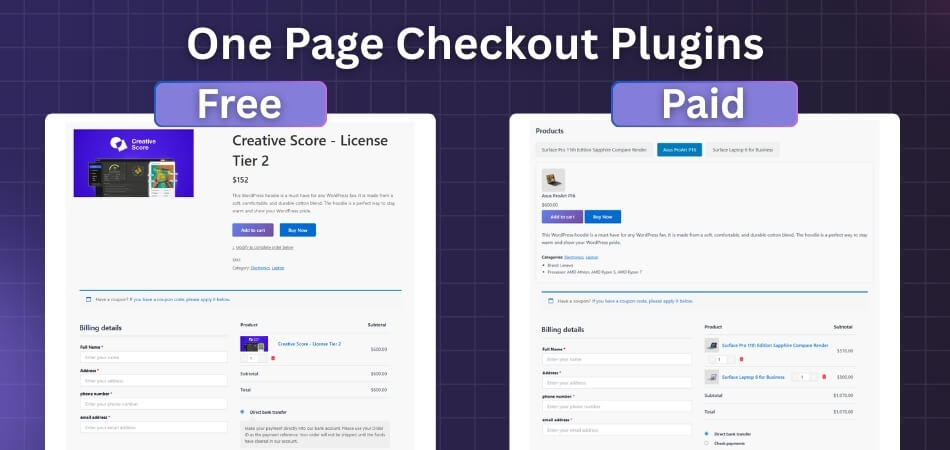
Why stable checkout matters in 2026
The era of treating checkout as an afterthought is over. In 2026, the primary metric for a WooCommerce plugin isn't how many bells and whistles it adds to the cart—it's how reliably it moves a customer from "Add to Cart" to "Order Confirmed" without friction or failure. Merchants are shifting focus away from flashy, crypto-native gimmicks toward stable, fiat-backed flows that work on the first try, every time.
Stability is no longer just a technical preference; it is a conversion requirement. A checkout page that loads slowly or glitches during payment processing is the single biggest leak in an otherwise healthy store. Research from Krepling indicates that the best-performing plugins now prioritize speed and conversion optimization over feature bloat. When a plugin is fragile, it doesn't just annoy users—it actively kills sales.
This means evaluating plugins based on their uptime, their compatibility with modern payment gateways, and their ability to handle high traffic without crashing. We are seeing a clear trend where merchants choose robust, well-maintained solutions over those with novel but unproven features. The goal is to remove every possible point of failure between the shopper's intent and their purchase.
Top 5 checkout plugins compared
Choosing a checkout plugin is less about finding the newest feature and more about picking a stable foundation that won’t crash when your traffic spikes. The best WooCommerce checkout plugins of 2026 balance conversion optimization with reliable performance. We’ve narrowed the field to five solid options that handle custom fields, conditional logic, and extra fees without slowing down your store.
The following comparison focuses on what matters most for store owners: ease of use, platform compatibility, and specific conversion features. If you’re looking to reduce cart abandonment, the plugin’s ability to streamline the checkout flow is the primary metric to watch.
| Plugin | Key Feature | Compatibility | Pricing Model |
|---|---|---|---|
| WooCommerce Checkout Field Editor | Custom field management | WooCommerce | Freemium |
| Tyche Softwares Checkout Manager | Conditional logic | WooCommerce | Freemium |
| CartFlows | Checkout funnels | WooCommerce | Freemium |
| YITH WooCommerce Checkout | One-page checkout | WooCommerce | Premium |
| Flits – One Page Checkout | Speed optimization | Shopify | Freemium |
Krepling Pay
Krepling Pay is designed for merchants who want a checkout experience that looks like it was built from scratch but requires zero custom coding. It functions as a pre-built, white-labeled solution, meaning the checkout interface carries your brand’s colors and fonts rather than the plugin provider’s. This approach removes the friction of designing a payment flow from the ground up while maintaining a professional, cohesive look.
The plugin integrates directly with WooCommerce, focusing on stability and speed. It handles the complex backend logic of payment gateway connections, allowing you to offer multiple payment methods—such as credit cards, digital wallets, and local options—without managing separate API keys for each. For a business prioritizing conversion optimization, this consolidation reduces the chance of technical errors during the critical payment moment.
Unlike open-source checkout builders that require constant maintenance and security patches, Krepling Pay operates as a managed service. This shifts the burden of uptime and compliance away from your development team. The interface is intuitive, allowing store owners to toggle features like one-click upsells or guest checkout options without touching code. It is a practical choice for merchants who view the checkout as a stable utility rather than a marketing playground.
FunnelKit and CartFlows: Full-Funnel Optimization
If you are looking beyond a single checkout page, FunnelKit and CartFlows are the heavy hitters for building complete sales ecosystems within WordPress. Both tools allow you to construct multi-step funnels, upsell sequences, and order bumps directly inside WooCommerce, turning a simple transaction into a structured customer journey.
FunnelKit: The All-in-One Funnel Builder
FunnelKit (formerly WooFunnels) is designed for merchants who want a unified system for their entire sales process. It integrates checkout optimization with email marketing, affiliate management, and analytics in one dashboard. The platform is particularly strong for businesses that rely on backend automation and affiliate programs to drive volume. Its "One-Time Offers" feature allows you to insert upsell steps seamlessly between the initial purchase and the final confirmation, a tactic proven to increase average order value without adding friction to the main checkout flow.
CartFlows: The Dedicated Funnel Specialist
CartFlows takes a more modular approach, focusing exclusively on building high-converting checkout and sales funnels. It is lightweight and integrates deeply with popular page builders like Elementor, allowing for pixel-perfect design control over every step of the funnel. CartFlows is ideal for merchants who prioritize design flexibility and speed over a bundled suite of marketing tools. Its step-through builder makes it easy to create complex checkout flows with conditional logic, ensuring customers only see the options relevant to their specific cart contents.
Which Fits Your Workflow?
Choose FunnelKit if you need a comprehensive marketing stack that includes email and affiliate tools alongside your checkout. Opt for CartFlows if you want a dedicated, design-focused funnel builder that plays nicely with your existing page editor. Both are stable, widely used, and capable of handling high traffic without breaking your WordPress site.
Field customization with Checkout Field Editor
The Checkout Field Editor plugin gives you precise control over the checkout form, allowing you to remove unnecessary fields and add custom ones that matter to your customers. By trimming the fat, you reduce cognitive load; by adding relevant details, you gather the data you need without asking for it later.
The real power lies in conditional logic. You can set rules so that specific fields only appear when certain conditions are met. For example, a "Gift Message" field can be hidden by default and only shown when the customer selects the "This is a gift" checkbox. This keeps the form clean for most users while still capturing special instructions when needed.
This approach extends to payment options as well. You can hide or show payment gateways based on the cart total or shipping method. If a customer is buying a low-value item, you might hide expensive wire transfer options and only show instant credit card processing. This reduces friction by presenting only the relevant, stable payment methods, guiding the user toward a quicker decision.
Speed Optimization with Fast Cart
Page load speed is the silent killer of conversions. Even a one-second delay can drop your conversion rate by 7%, and this penalty is most severe during the critical checkout phase. Users expect instant feedback; they do not want to wait for a new page to load just to review their order.
Fast Cart solves this by replacing the traditional checkout link with an AJAX-powered pop-up. When a customer adds an item, the cart expands directly on the current page. This keeps the shopper in the flow, reducing friction and preventing them from leaving to navigate elsewhere. It is a simple change that respects the user’s time.
The stability of this approach matters. By handling the cart update via asynchronous requests, you avoid full page reloads that can cause layout shifts or timeout errors. For a WordPress site, this means a smoother experience that feels native and responsive, encouraging the final click without the technical baggage of traditional checkout flows.
How to choose the right plugin
Stability isn't just about uptime; it's about how the checkout behaves when your traffic spikes or when you add a complex product variant. Before installing a new plugin, run a quick audit of your current stack. A lightweight checkout extension can slow down your site if it conflicts with your theme's scripts or caching layer. Test the plugin on a staging site first—watch for JavaScript errors in the browser console and ensure the mobile view doesn't break your layout.
Match the tool to your store's actual needs, not the feature list you might want later. If you sell simple physical goods, a minimal checkout like WooCommerce Fast Cart keeps things lean. If you need conditional logic for B2B pricing or custom fields, look for robust managers like Checkout Manager for WooCommerce. Avoid bloated suites that try to do everything unless you have the technical skill to manage the complexity.
As an Amazon Associate, we may earn from qualifying purchases.
Common questions about checkout plugins
Choosing a checkout plugin often means balancing speed with customization. The right choice depends on your specific WooCommerce setup and conversion goals.
Are checkout plugins compatible with all WordPress themes?
Most major plugins like WooCommerce Stripe Gateway or Klarna Checkout are built to integrate with the official WooCommerce API, ensuring broad theme compatibility. However, aggressive custom themes may require minor CSS adjustments to display checkout fields correctly. Always test on a staging site first.
Do these plugins slow down my site?
Heavy checkout pages hurt conversions. Lightweight plugins like Fast Cart by Barn2 focus on reducing script bloat by using AJAX popups instead of full-page reloads. Avoid plugins that load excessive external scripts or high-resolution images directly in the checkout flow.
Is setup complex for beginners?
Core payment gateways are plug-and-play. Advanced features like conditional logic or custom fields (common in Checkout Manager plugins) require a steeper learning curve. Most reputable plugins offer clear documentation, but complex logic often benefits from a developer's touch to ensure stability.
No comments yet. Be the first to share your thoughts!